Tutorial: SLOTH Input Files in a Nutshell
This tutorial explains how a SLOTH simulation is built, independently of any application: the philosophy of the code, the structure of an input file in four parts, then each part in detail.
It is the natural companion of the Basic features page: Basic features walks through one complete example (Allen-Cahn in 1D), while this tutorial gives the general pattern behind every SLOTH input file, including multiphase and multiphysics cases.
Slides
This tutorial is also available as a slide deck: download the PDF.
1. The SLOTH Philosophy
Four ideas are enough to understand a SLOTH input file.
There is no text input file: a SLOTH input file is a compiled main.cpp that assembles SLOTH objects. C++ typing catches many inconsistencies at compile time, and any function can be written. The same file runs on a workstation or on a cluster.
Neither the weak form, nor the assembly, nor the nonlinear solver are written by the user. One chooses an operator, TransientOPE for a transient simulation or SteadyOPE for a steady one, and names its integrators, which carry the variational formulation of the problem.
The energy functional and the kinetic parameters (mobilities) are SLOTH Coefficient objects, written as formulas in a JSON file and differentiated by Sympy. This is what makes multiphase simulations simple.
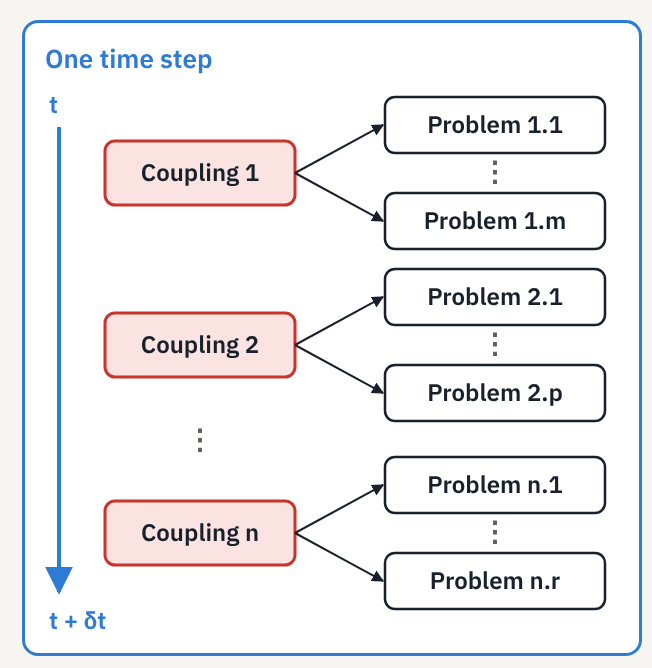
TimeDiscretization ⊃ { Coupling ⊃ { Problem } }: a time step solves couplings, each coupling solves problems. Adding a physics means adding a Problem.
2. An Input File in Four Parts
Every SLOTH main.cpp follows the same skeleton, whatever the problem:
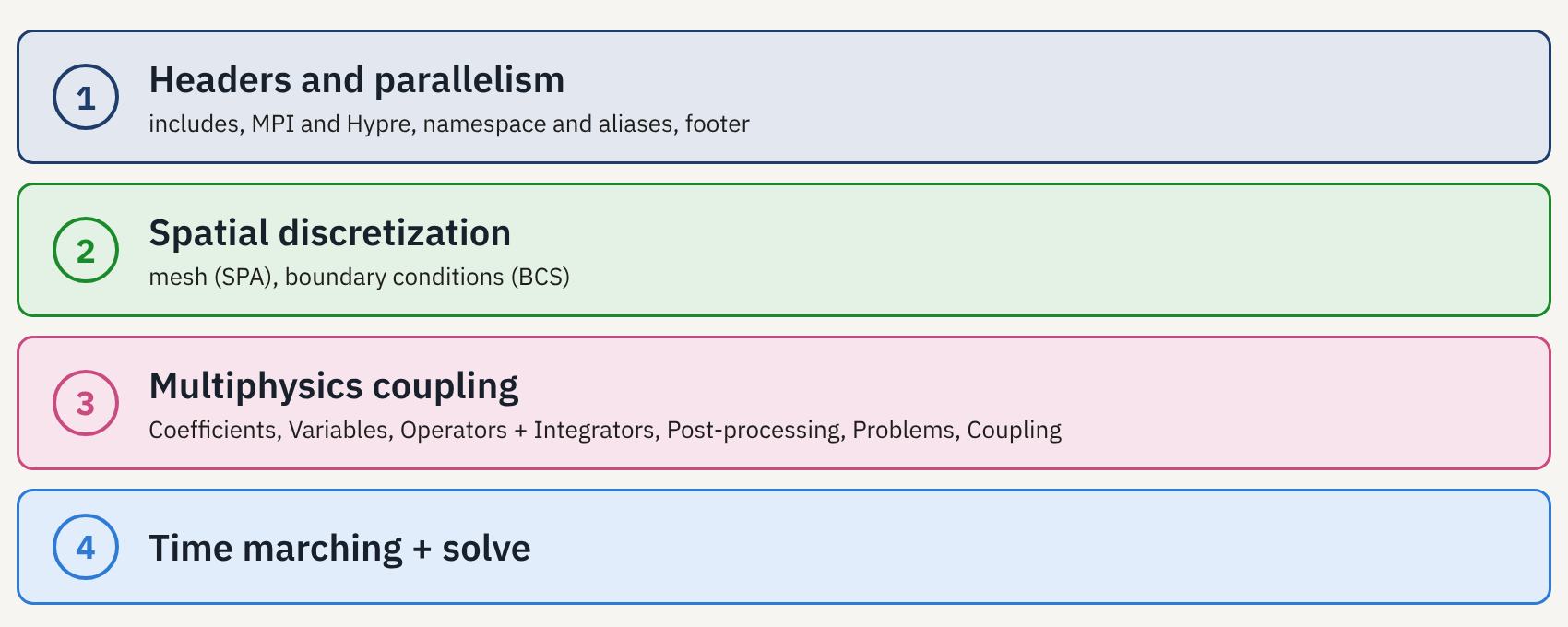
- Headers and parallelism: includes, MPI and Hypre, namespace and aliases, footer.
- Spatial discretization: mesh (
SPA) and boundary conditions (BCS). - Multiphysics coupling: coefficients, variables, operators and integrators, post-processing, problems, coupling. This is where the physics comes in.
- Time marching and resolution:
TimeDiscretization, thentime.solve().
Parameters
Options are almost always passed through Parameters(Parameter(name, value), ...).
3. Part 1 – Headers and Parallelism
Part 1 is identical from one simulation to the next: it opens and closes the simulation.
// ── header ──
#include "Sloth/sloth.hpp"      // all of SLOTH
#include "Sloth/tests.hpp"      // test utilities
#include "MyCoefficients.hpp"   // your Sympy-generated .hpp
int main(int argc, char* argv[]) {
  setVerbosity(Verbosity::Normal);   // output level
  mfem::Mpi::Init(argc, argv);       // MPI
  mfem::Hypre::Init();               // Hypre solvers
  Profiling::getInstance().enable();
  using namespace Sloth2D;           // dimension, aliases

  // … parts 2, 3 and 4 …

// ── footer ──
  Profiling::getInstance().print();  // timings
  MPI_Finalize();
  return 0;
}
using namespace Sloth2D; (or Sloth1D, Sloth3D) sets the dimension and gives access to the main aliases:
| Alias | Meaning |
|---|---|
SPA |
spatial discretization |
SPAS |
vector of SPA |
BCS |
boundary conditions |
VAR / VARS |
one variable / a set of VAR |
PST |
post-processing |
TransientOPE / SteadyOPE |
an operator type |
TransientPB / SteadyPB |
a problem type |
See the Aliases page of the User Manual for the full list. When the factories of Part 2 are used, deleteSpatialDiscretization is added to the footer.
4. Part 2 – Spatial Discretization
Step 1 – The mesh: a SPA object
A mesh is built with one call and (at least) four arguments:
- mesh type:
"GMSH"to read a.mshfile (ASCII v2), or an MFEM "inline" mesh:InlineLineWithSegments(1D),InlineSquareWithQuadrangles/InlineSquareWithTriangles(2D),InlineSquareWithTetraedres/InlineSquareWithHexaedres(3D); - element order:
1= linear; - uniform refinements:
0= none; - dimensions: number of cells then lengths in each direction (or the file name for GMSH).
Optional arguments:
- periodic mesh: a vector of translations;
- AMR:
enable_nc_mesh = truefor a non-conforming mesh, which cannot be switched on afterwards (see the AMR tutorial); - GMSH file:
SPA("GMSH", 1, 0, "mesh.msh").
See the Meshing page of the User Manual for all the meshing options.
Step 2 – Boundary conditions: a BCS object
Boundary conditions are a BCS object built on a SPA, with exactly one Boundary per edge:
BCS bcs(&spatial, {
  Boundary("lower", 0, "Neumann"),
  Boundary("right", 1, "Dirichlet", 1.),
  Boundary("upper", 2, "Neumann"),
  Boundary("left",  3, "Dirichlet", 0.)});
A Boundary is made of a free name, an index, a type (Dirichlet, Neumann, Robin, Periodic) and, for a uniform Dirichlet condition, its value.
The right index
The name is free, but the index must match the edge attribute in the mesh. For the MFEM square: 0 bottom, 1 right, 2 top, 3 left. For a GMSH mesh, use the attributes defined in the file.
Each variable receives its BCS when it is created (see Part 3). See the Boundary Conditions page of the User Manual for all condition types.
Step 3 – Going further: several fields on one mesh
In multiphase simulations, or with AMR, several fields often share one mesh. The same result can be obtained by hand or with factories:
// shared, non-conforming mesh
SPA spatial_phi("InlineSquareWithQuadrangles",
                1, 0, std::make_tuple(200, 200, 50., 50.),
                true);
SPA spatial_mu(spatial_phi.get_mesh(), 1);
// one common list of edges
auto boundaries = {
  Boundary("lower", 0, "Neumann"),
  Boundary("right", 1, "Neumann"),
  Boundary("upper", 2, "Neumann"),
  Boundary("left",  3, "Neumann")};
// one BCS per variable
BCS bcs_phi(&spatial_phi, boundaries);
BCS bcs_mu(&spatial_mu, boundaries);
Each variable gets its own SPA, built on the mesh of the first one with get_mesh(). Orders may differ. This is required for AMR, since all variables must follow the same refinements.
const int N = 5;  // 5 grains
// N spaces, one mesh
SPAS spatials = setSpatialDiscretization(
    N, "InlineSquareWithQuadrangles",
    1, 0, std::make_tuple(200, 200, 50., 50.),
    true);
// same list of edges
auto bcs = setBoundaryConditions(N, spatials, boundaries);

// … variables, problems, time …

// in the footer
deleteSpatialDiscretization(spatials);
setSpatialDiscretization(N, ...) takes, after N, the arguments of the SPA constructor (setPeriodicSpatialDiscretization for a periodic mesh). setBoundaryConditions builds the N BCS from a single list of Boundary: bcs[i] goes with spatials[i]. Objects created by the factory are freed in the footer.
Non-uniform boundary values
A non-uniform boundary value is a Coefficient of type Glossary::Dirichlet, Neumann or Robin, attached to the edges with set_bdr_index_coef, and written in a JSON file like the energies (x, y as auxiliary, t for time):
See the factory sections of the Meshing and Boundary Conditions pages.
5. Part 3 – Multiphysics Coupling
Overview – One time step: nested boxes
At each time step, TimeDiscretization solves one or more Coupling, one after another. Each Coupling solves its Problem one after another (partitioned scheme). Each Problem gathers its coefficients, its primary variables, its operator with its integrators and its post-processing; it reads the fields of the other problems through its auxiliary variables, without solving them.
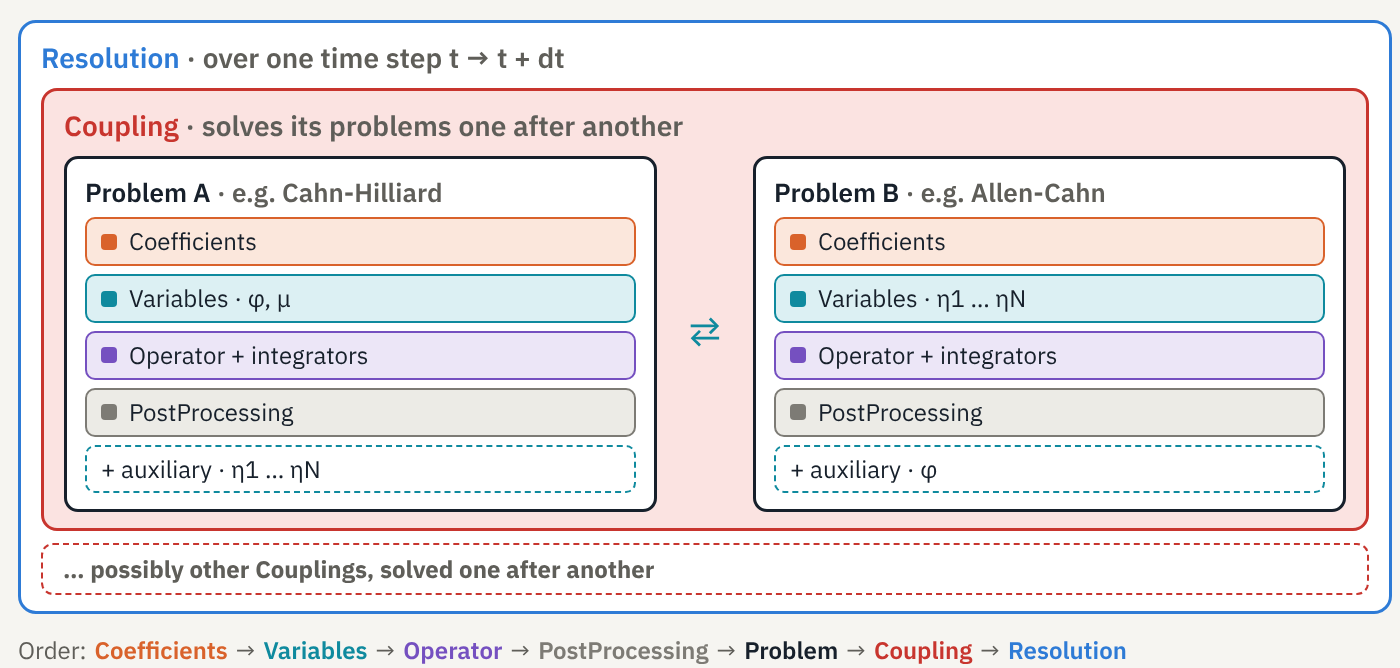
In the file, objects are written from the inside out, always in the same order:
Coefficients → Variables → Operator → PostProcessing → Problem → Coupling → Resolution (Part 4)
Step 1 – Physics: Coefficient objects
Coefficients carry the physics, kept separate from the numerics:
// a constant
Coefficient capillary(Glossary::Capillary, lambda);
// a function provided by SLOTH
Coefficient w(Glossary::FreeEnergy, Scheme::Implicit, W(omega));
// a function written in coefficients.json, generated by Sympy
Coefficient f(Glossary::FreeEnergy, Scheme::Implicit, Gc());
// the collection given to the problem
Coefficients ch_coef(f, capillary, mobility, grad_energy);
A Coefficient combines:
- a type: a quantity of the Glossary (
FreeEnergy,Mobility,Capillary,GradEnergy, …); - a scheme:
Implicit,ExplicitorSemiImplicit(not needed for constants); - a function: a constant, a function provided by
SLOTHsuch as the double wellW(omega)or a class generated by Sympy fromcoefficients.jsonwith its first and second derivatives (FunctionCoefficientfrom JSON), or an ExprTk expression written directly as a string.
The coefficients given to a problem are gathered in a Coefficients object.
Convention
In a function, the unknowns follow the order of the problem's Variables, then that of the auxiliary variables.
See the Coefficients page of the User Manual and the ExprTk and Sympy installation page.
Step 2 – The unknowns: VAR and VARS
auto phi = VAR(&spatial, bcs, "phi", Glossary::PhaseField, 2, phi_ic);
auto mu  = VAR(&spatial, bcs, "mu", Glossary::ChemicalPotential, 2, mu_ic);
auto ch_vars = VARS(phi, mu);    // the Cahn-Hilliard unknowns
A VAR is built on:
- a
SPAand itsBCS: the space and its boundary conditions (Part 2); - a name: the one used in the ParaView outputs;
- a type: a Glossary quantity;
- a storage depth (2 in the example);
- an initial condition: a constant, a predefined
AnalyticalFunctions, a user-writtenstd::function, or an MFEM file for a restart.
The variables of a problem are gathered in a VARS. SLOTH distinguishes two kinds of variables, defined the same way:
- primary variables, solved by the problem:
φandμfor Cahn-Hilliard; - auxiliary variables, solved by another problem and only read; they are passed as the problem's last argument. This is the coupling mechanism.
See the Variables page of the User Manual.
Step 3 – One physics = one operator + integrators
Every PDE is written
where is the form associated with the time derivative and with the spatial operators ( for a steady problem). The operator solves this system with a unified Newton-Raphson, even for linear equations; an LBFGS solver is also available. Each term is an integrator providing its contribution to the residual and the Jacobian.
| Family | Term | Integrators |
|---|---|---|
| Time | TimeDerivative, SplitTimeDerivative, HeatTimeDerivative,... |
|
| Phase field | AllenCahn, SplitAllenCahn, CahnHilliard,... |
|
| Diffusion, heat | Fick, MassFlux, Fourier,... |
|
| Sources | MeltingConstant, MeltingCalphad, LatentHeat,... |
Several integrators can be combined in , for example AllenCahn + MeltingConstant.
Required pairings
CahnHilliardandSplitAllenCahngo withSplitTimeDerivative;- melting terms go with
AllenCahn; LatentHeatgoes withFourier.
Coefficients (mobility, energy) are given to the problem, not to the operator.
See the PDEs page of the User Manual for all integrators and their equations.
Step 4 – Post-processing: a PST object
auto pst_params = Parameters(
  Parameter("main_folder_path", "Saves"),
  Parameter("calculation_path", "CahnHilliard"),
  Parameter("frequency", 100));
auto ch_pst = PST(&spatial, pst_params);
A PST is built on a space and a list of parameters: the root folder, the problem's sub-folder and the output frequency (iterations_list or times_list can be used instead of frequency). The variables of the associated problem(s) are written in ParaView format (VTK).
- Optional: with no
PST, there is no ParaView output for the problem. - Shareable: one
PSTfor several problems gives a single ParaView file. - Specialized: integrals over the domain can be computed, and coefficients can be exported to the VTK.
See the Post-Processing page of the User Manual for all output parameters.
Step 5 – Putting it together: a Problem
TransientPB ch_pb("CahnHilliard",   // name
    ch_oper,                        // operator + integrators
    ch_vars,                        // primary variables φ, μ
    {ch_coef, ch_coef},             // one Coefficients per variable
    ch_pst,                         // post-processing (optional)
    ac_vars);                       // auxiliary η1 … ηN (optional)
TransientPB (or SteadyPB with a SteadyOPE) takes a name, the operator, the primary variables, a vector of Coefficients, then optionally the post-processing and the auxiliary variables as last argument.
The vector of Coefficients
- As many
Coefficientsas variables: the vector has the size ofVARS. - In the same order: the i-th
Coefficientsgoes with the i-th variable.
Optionally, a Convergence object (one PhysicalConvergence criterion per variable) stops the simulation when the steady state is reached (see the Convergence page).
See the Problems page of the User Manual.
Step 6 – Chaining problems: a Coupling
A Coupling has a name and a list of problems, solved one after another at each time step, in the order they are written: this is a partitioned scheme. Each problem reads the fields of the others through its auxiliary variables. Inside a problem, on the other hand, the unknowns are solved together: φ and μ of Cahn-Hilliard form a monolithic system.
See the Couplings page of the User Manual.
6. Part 4 – Time Marching and Resolution
auto params = Parameters(
  Parameter("initial_time", 0.),
  Parameter("final_time", t_final),
  Parameter("time_step", dt));
auto time = TimeDiscretization(params, cc);
time.solve();    // runs the simulation
TimeDiscretization takes a list of parameters (initial time, final time, time step) and one or more Coupling, solved one after another at each step: TimeDiscretization(params, cc1, cc2, …). time.solve() starts the loop. Then comes the footer of Part 1.
Two useful options:
- Variable time step (but not adaptive): a
std::function<double(double)>replacestime_step; - Restart:
initial_iterationrestarts from a saved state (see the Save/Restart tutorial).
See the Time page of the User Manual for all the time-loop options.
7. From the Simple Case to the Multiphase Case
A multiphase Cahn-Hilliard + Allen-Cahn simulation keeps exactly the same skeleton as the simple case of Basic features. Parts 1, 2 and 4 only change with the dimension (Sloth2D or Sloth3D, square, cube or GMSH mesh); only Part 3 changes:
| Simple case | Multiphase case | |
|---|---|---|
| One problem per equation | One Problem: Allen-Cahn |
Cahn-Hilliard (, ) + Allen-Cahn (), in one Coupling |
| Auxiliary variables | None | Each problem reads the other's fields without solving them |
| Energy | W(omega), H(): provided by SLOTH |
in the JSON file, differentiated by Sympy |
8. Where to Find Information
| Step | Where | What |
|---|---|---|
| Get started | Getting started, Basic features | install and build; the structure of an input file |
| Get inspired | Examples, tests/ in the SLOTH repository |
commented cases; complete main.cpp files |
| Go deeper | User Manual, PDEs, Tutorials | all the options; operators and integrators; AMR, save/restart |
| Get help | mfem.org, GitHub issues | numerics and MPI; bugs and questions |