Tutorial: Using Adaptive Mesh Refinement (AMR)
This tutorial explains how to enable Adaptive Mesh Refinement (AMR) on a SLOTH simulation.
It builds on a standard Cahn-Hilliard simulation (see the Cahn-Hilliard examples) and highlights only the additions required to switch it on.
1. Building AMR-ready Spatial Discretizations
Step 1 – Enable non-conforming refinement on the mesh
AMR relies on locally refining/coarsening a mesh, which requires the mesh to support non-conforming refinement (see the dedicated page on the MFEM website for more details). This is enabled by adding two boolean flags, enable_nc_mesh and allow_nc_simplices, as the last arguments of the SPA constructor, whatever the type of mesh (periodic or not, built from file or not):
SPA spatial_phi(mesh_type, order_fe, refinement_level, tuple_of_dimensions, /*enable_nc_mesh*/ true);
enable_nc_mesh(defaultfalse) is the flag that actually builds the mesh in non-conforming mode. It must be set totrueto use AMR - a conforming mesh cannot be converted afterwards.allow_nc_simplices(defaultfalse, omitted above) additionally allows non-conforming refinement on triangle/tetrahedron elements specifically; it has no effect on quadrilateral/hexahedral meshes such as the one used here. If your mesh is made of triangles or tetrahedra, pass it explicitly too:
SPA spatial_phi(mesh_type, order_fe, refinement_level, tuple_of_dimensions, /*enable_nc_mesh*/ true, /*allow_nc_simplices*/ true);
The value passed for allow_nc_simplices can later be read back with is_nc_simplices(), which is needed to configure the AMR driver (see Step 3). See the Meshing page of the User Manual for the full constructor signatures (GMSH and MFEM inline meshes, with or without periodicity).
Step 2 – Share the same mesh across all variables
All the variables involved in the coupling must live on the same mesh, so that a refinement decision taken for one variable is consistently applied to every finite element space. Additional SPA objects are therefore built from the mesh of the first one, rather than from mesh_type / tuple_of_dimensions again:
Building an SPA object from an existing mesh is also interesting for simulations that do not involve AMR. Such an approach lets several variables share the same mesh while using different finite element orders (order_fe) for each of them. If every variable uses the same finite element order, a single SPA object is enough — there is no need to build additional ones from get_mesh(). With AMR, this pattern becomes essential, since it is now the only way to guarantee that every variable follows the same sequence of refinements/derefinements applied to the shared mesh.
Here, spatial_mu gets its own, independent finite element space (it can even use a different order_fe), while sharing the mesh (mfem::ParMesh) held by spatial_phi. This constructor also accepts a third, optional argument, is_periodic_mesh (default false): if the shared mesh is periodic, pass spatial_phi.is_periodic() so that spatial_mu reports its periodicity correctly too.
Mesh ownership
spatial_mu does not take ownership of the mesh: it will never delete it. The SPA object that originally created the mesh (spatial_phi here) must therefore outlive every SPA object built from it.
AMR Requirements
To use AMR, the following conditions must be satisfied:
- The
SPAobject driving the mesh must be built withenable_nc_meshset totrue(andallow_nc_simplicesset totrueas well, if the mesh is made of triangles/tetrahedra). - Every other
SPAobject used by the variables of the coupling must be built from that same mesh, usingspatial.get_mesh(), rather than from a new mesh definition. - Boundary conditions (
BCS) and variables (VAR) are then declared exactly as usual, one perSPAobject.
2. Defining an Error Estimator
Refinement decisions are driven by an error estimator, evaluated on the mesh shared in Step 1. It can be built from an MFEM bilinear form integrator and wrapped into a SlothErrorEstimators object:
mfem::ConstantCoefficient amr_coef{1.0};
mfem::DiffusionIntegrator amr_integ{amr_coef};
SlothErrorEstimators estimator(ErrorEstimatorType::KELLY, &amr_integ);
amr_integis a standardMFEMintegrator (heremfem::DiffusionIntegrator, built from a constant coefficient) used to evaluate the estimator on each mesh face.ErrorEstimatorType::KELLYselects the Kelly error estimator, which flags elements for refinement based on the jump of the estimated quantity across element faces.
Available error estimators
SLOTH currently provides two error estimators built on top of MFEM: ErrorEstimatorType::KELLY (shown above) and ErrorEstimatorType::L2_ZIENKIEWICZ_ZHU (Zienkiewicz–Zhu). More estimators may be added in the future. See the Adaptive Mesh Refinement page of the User Manual for a complete description of each estimator and how to configure it.
3. Configuring the AMR Driver
Step 1 – Create the AMR object
The SingleVariableAMR object drives the refinement/coarsening of the shared mesh, based on one "driving" variable of the coupling:
Its arguments are:
- The shared mesh (dereferenced
mfem::ParMeshreturned byget_mesh()). - Whether non-conforming refinement was allowed on simplex elements when the mesh was built, obtained with
is_nc_simplices()— this must simply mirror theallow_nc_simplicesvalue passed to theSPAconstructor (see Step 1); for quadrangle/hexahedron meshes such as the one used here, it is left at its default (false). - The variable used to drive the refinement (the pilot variable), given by its index within
VARS(0here refers to the first variable declared invars, i.e.phi) or by its name ("phi").
Driving the refinement with several variables
When a single variable is not sufficient to characterize where the mesh should be refined, SLOTH also provides MultiVariableMaxAMR<VARS>, which considers several pilot variables at once: every variable of VARS by default, or the variables whose names are given as a third argument (e.g. std::vector<std::string>{"phi", "c"}). For each element, the per-variable errors are combined by taking their maximum, and the mesh is refined/derefined once from this combined criterion, so an element is a candidate as soon as any pilot variable needs it resolved there. Refer to the Adaptive Mesh Refinement page of the User Manual for details.
Step 2 – Set the refinement criteria
auto amr_params = Parameters(Parameter("max_elem_error", 1.e-4), Parameter("amr_max_level", 4),
                               Parameter("nc_limit", 0), Parameter("max_preref_cycles", 4));
amr.SetCriteria(/*estimator*/ &estimator, amr_params);
| Argument/Parameter | Type | Description |
|---|---|---|
estimator |
SlothErrorEstimators* |
The error estimator defined in Section 2. |
max_elem_error |
double |
Error threshold above which an element is flagged for refinement. |
amr_max_level |
int |
Maximum number of refinement levels allowed for any element. |
nc_limit |
int |
Maximum allowed level difference between two neighboring elements (0 = no limit enforced). |
max_preref_cycles |
int |
Maximum number of refinement cycles applied to the mesh, based on the initial condition of the driving variable, before the first time step is solved. |
Parallel computations: load balancing
Refinement concentrates the elements on the MPI processes that own the interfaces. Adding Parameter("rebalance", true) to amr_params redistributes the mesh between processes after each AMR pass that modified it. See the Load balancing section of the User Manual.
Step 3 – Attach the AMR driver to the problem
Once attached, SLOTH automatically checks the refinement criteria and updates the shared mesh (and every finite element space and variable built on it) as the simulation progresses — no further action is required from the user during time integration.
Summary
Enabling AMR on a SLOTH simulation consists of:
- Building the first
SPAobject withenable_nc_meshset totrue(andallow_nc_simplicestoo, for triangle/tetrahedron meshes), then building every otherSPAobject of the coupling from its shared mesh (spatial.get_mesh()). - Defining an error estimator (
SlothErrorEstimators) from anMFEMintegrator. - Creating a
SingleVariableAMR(orMultiVariableMaxAMR) object, setting its refinement criteria withSetCriteria, and attaching it to the problem withset_amr.
Complete Example
A complete working example is available in the SLOTH repository:
- 2D spinodal decomposition (Cahn-Hilliard) with AMR: https://github.com/Collab4Sloth/SLOTH/blob/master/tests/CahnHilliard/2D/test2_amr/main.cpp
- 2D rising bubble (Cahn-Hilliard + advection) with AMR and load balancing: https://github.com/Collab4Sloth/SLOTH/blob/master/tests/CahnHilliard/2D/test6/main.cpp
- 2D grain growth (one problem per grain, one AMR object per problem): https://github.com/Collab4Sloth/SLOTH/blob/master/tests/Studies/multigrains/test1_amr/main.cpp
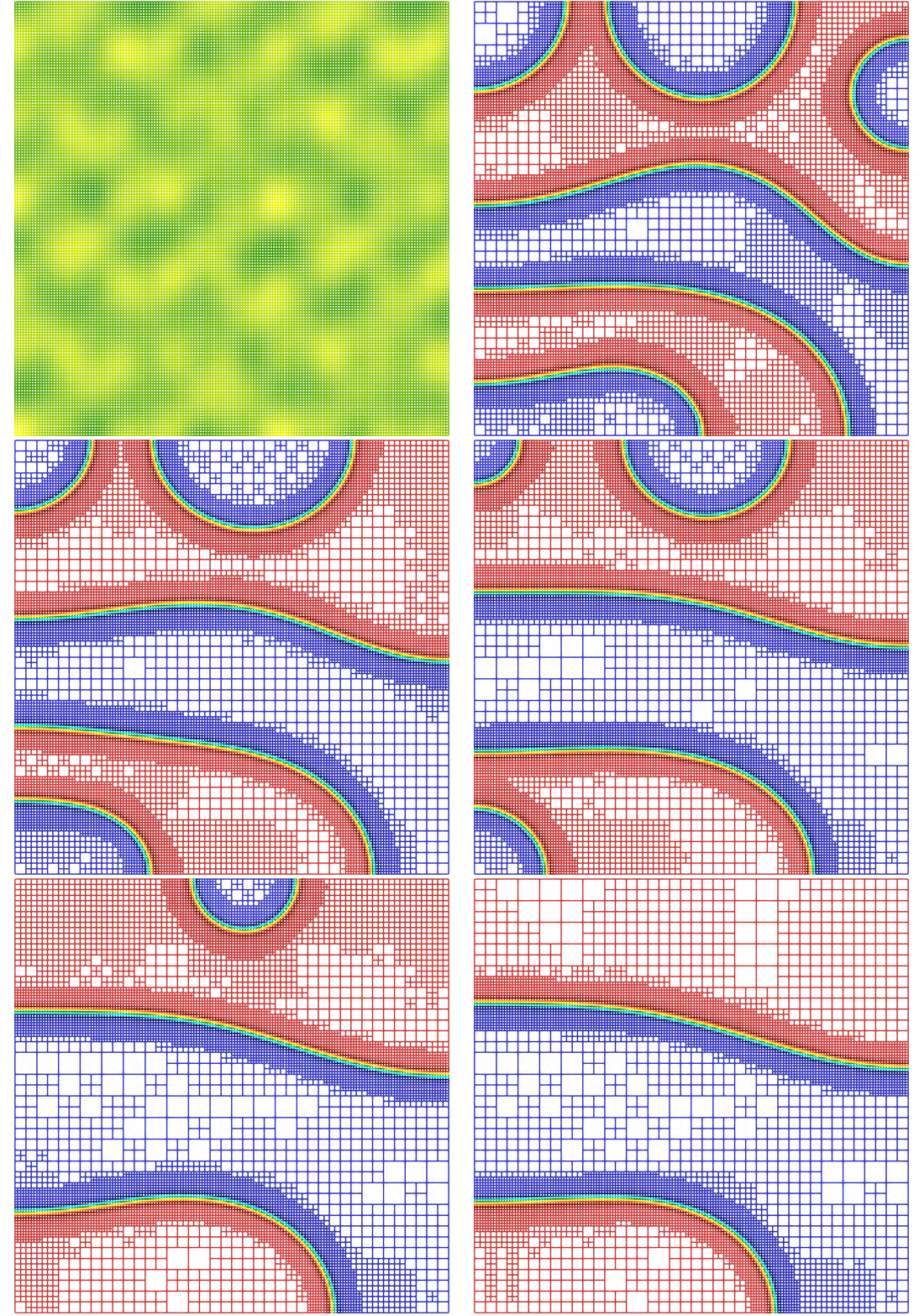
The figure 1 shows the evolution of the spinodal decomposition with AMR (until a final simulation time set to ).